Why the Best WordPress SEO Plugins Are Now Essential
If you manage a blog, run an online business, or handle client sites on WordPress, you’ve probably heard a million times that SEO is essential. But here’s the tough truth: what worked for getting found on Google two years ago is simply not enough today.
The digital landscape in 2025 demands more than just adding a keyword to your title. Google now judges your site not only on what you say but how fast, reliable, and trustworthy (E-E-A-T) your site is. This shift means every WordPress site manager needs a sophisticated set of tools to compete. Simply put, investing in the Best WordPress SEO Plugins is no longer optional—it’s the competitive advantage.
This comprehensive guide is designed for you—the non-technical blogger, the busy small business owner, and the smart marketer—looking to grow your audience without needing a computer science degree.
We have spent hours analyzing the top contenders to bring you an unbiased, actionable list of the 10 most crucial WordPress SEO plugins for 2025. We will cover the core metadata managers, the speed specialists, and the AI-powered content helpers. By the end of this 3,000+ word deep dive, you will know exactly which tools to install (and which to skip) to build a future-proof, high-ranking website.
Also read:
The Best SEO Plugins for Bloggers to Skyrocket Traffic and Rank Higher on Google
10 Best WordPress Plugins Every Website Needs
1. Choosing Your Core: The All-in-One SEO Suites
Every WordPress site needs a central control center to manage titles, meta descriptions, and sitemaps. This is the foundation of your SEO effort. In 2025, four primary players dominate this space, each catering to a specific type of user.
1.1. Rank Math SEO: The Technical Powerhouse
Primary Focus: Feature density, advanced schema, and AI integration.
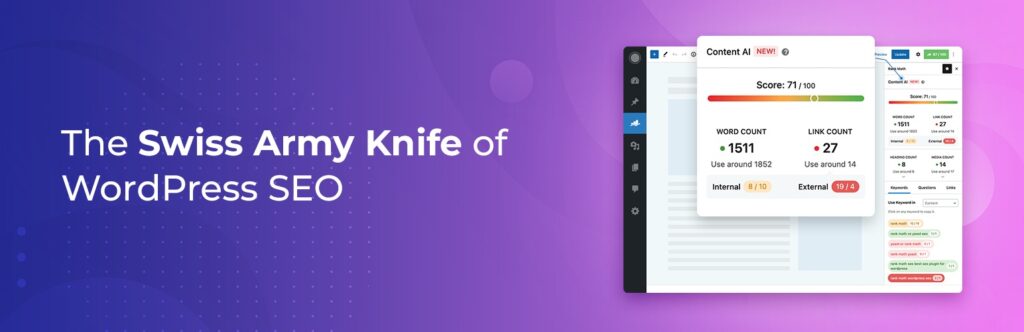
Why it’s on the list: Rank Math has aggressively positioned itself as the most feature-rich option, particularly attractive to intermediate users, agencies, and anyone looking for the maximum tools for free. It’s frequently cited as one of the Best WordPress SEO Plugins due to its expansive capabilities.
Free vs. Paid Comparison (Rank Math):
| Feature | Rank Math (Free) | Rank Math (Pro) |
| Core On-Page SEO | Full access (Title/Meta, sitemaps) | Full access |
| Schema/Rich Snippets | Over 16 predefined types; superior generator | Advanced Schema Builder, reusable schema templates |
| Content Analysis | Up to 5 focus keywords, advanced suggestions | AI-powered Content AI scoring (0-100 score) |
| Utility Tools | Built-in 404 monitoring, redirection manager | Keyword Rank Tracking, Analytics Integration |
| Builder Integration | Superior global SEO options for Elementor templates/widgets | More advanced setup and conditional logic |
For the Non-Techie: Imagine your SEO plugin is a new smartphone. Rank Math is the Android of SEO—packed with features, customization, and tools that others charge for (like that built-in redirection manager, which keeps old links from breaking). Its scoring system gives you a simple 0-100 rating, telling you instantly if your article is optimized and ready to publish.
The Rank Math Advantage: Its free version includes critical utilities like a redirection manager and 404 error logger, tools that minimize plugin conflicts and bloat. Its structured data implementation is robust, offering more schema types and a better interface than competitors, even in the free tier.
Also read: The Amazing Rank Math SEO Plugin Setup Guide
1.2. All in One SEO (AIOSEO): The Beginner’s Champion
Primary Focus: Simplicity, user-friendly workflows, and local SEO.
Why it’s on the list: AIOSEO is consistently rated as the top choice for absolute beginners and small business owners who value a clean, reliable, and easy setup.
Free vs. Paid Comparison (AIOSEO):
| Feature | AIOSEO (Lite/Free) | AIOSEO (Pro/Elite) |
| Core On-Page SEO | Full Title/Meta management, basic sitemaps | Full Control |
| Setup | Most user-friendly setup wizard | Full Control |
| Workflow Tool | None | Link Assistant (Automated internal link suggestions) |
| Structured Data | Basic Schema | Dedicated FAQ block (automatically generates schema) |
| Specialized SEO | Basic Local SEO | Advanced Local SEO, WooCommerce optimization, Redirection Manager |
For the Non-Techie: AIOSEO is the iPhone of SEO. It’s simple, reliable, and its setup wizard guides you through the process perfectly so you “can’t get it wrong”. Its standout feature, the Link Assistant, is like having a helpful editor automatically tell you which of your old articles you should link to . This is a massive time-saver for growing sites. If your primary goal is to DIY your SEO without hiring an expert, AIOSEO is an excellent fit .
The AIOSEO Advantage: Its focus on workflow is unmatched. The TruSEO analysis provides clear, actionable recommendations. Plus, it makes optimizing for Google’s People Also Ask (PAA) box incredibly easy with its dedicated FAQ block that automatically applies the necessary schema.
1.3. Yoast SEO: The Content & Readability Standard
Primary Focus: Content quality, editorial excellence, and readability scoring.
Why it’s on the list: Yoast SEO is the industry veteran. While newer plugins boast more technical features, Yoast remains the authority for ensuring your content is clear, well-structured, and easy for your human audience to digest.
Free vs. Paid Comparison (Yoast SEO):
| Feature | Yoast SEO (Free) | Yoast SEO (Premium) |
| Content Quality | Full SEO score (Focus keyphrase check, length, links) | Related keyphrase optimization (using multiple keywords) |
| Readability Analysis | Best-in-class readability checks (Flesch score, sentence length) | Full Analysis |
| Utility Tools | Basic sitemaps, robots.txt editing | Internal linking suggestions, Redirect manager |
| Support/Training | Limited | Premium support and access to SEO courses |
For the Non-Techie: Yoast shines in the Readability Analysis. It uses a simple red/yellow/green “traffic light” system to check your work, ensuring your sentences aren’t too long and your paragraphs are easy to scan. This focus is crucial because readable content keeps people on your page longer, which Google loves. If you are a writer or blogger, Yoast acts as your editorial guardian, ensuring your content is as good for people as it is for search engines.
The Yoast SEO Advantage: Its deep focus on editorial quality is unique. Even in the competitive 2025 landscape, its readability analysis is considered superior, guiding users to create accessible and easily digestible content.
1.4. SEOPress: The Value Proposition
Primary Focus: Cost-effective comprehensive features for agencies and high-volume users.
Why it’s on the list: SEOPress provides near-feature parity with the market leaders but often at a fraction of the cost, especially for professionals who manage many websites. It’s the “budget-friendly hidden gem”.
Free vs. Paid Comparison (SEOPress):
| Feature | SEOPress (Free) | SEOPress (Pro – Unlimited) |
| Core Suite | Title/Meta, basic sitemaps, content analysis | Full Suite |
| Advanced Features | None | Video SEO, Local SEO, WooCommerce optimization |
| AI Integration | None | Uses OpenAI to generate metadata and image alt texts |
| Licensing | Unlimited sites, basic features | Unlimited sites, all PRO features |
For the Non-Techie: SEOPress is the smart budget choice. If you run multiple websites or plan to scale your business, its PRO Unlimited license allows you to use all its features on countless sites for a single, low annual fee . It integrates modern tools, including using AI to quickly write your meta descriptions for you.
The SEOPress Advantage: SEOPress is specifically targeted at high-volume webmasters and agencies . Its unlimited site licensing and comprehensive feature set, including advanced tracking (like Google Analytics Enhanced E-commerce tracking), make it the most cost-effective way to deploy enterprise-level SEO features.
2. The Specialist Tools: Performance, Schema, and Authority
While a core suite manages metadata, top performance in 2025 requires specialized, best-in-class tools to secure your technical and content advantage. These plugins tackle the toughest ranking factors: speed and trust.
2.1. WP Rocket: The Core Web Vitals Specialist
Primary Focus: Site speed optimization and maximizing Core Web Vitals (CWV) scores.
Why it’s on the list: Google has made Core Web Vitals (CWV)—metrics like Largest Contentful Paint (LCP) and Interaction to Next Paint (INP)—a fundamental ranking requirement. WP Rocket is the leading premium caching plugin dedicated to making your site lightning fast and hitting those crucial CWV targets .
Is it Free or Paid? WP Rocket is a premium-only plugin; there is no free version .
The Why: A slow site is a non-starter in 2025. WP Rocket is essential because it simplifies complex optimizations like deferred loading of JavaScript and Critical CSS generation, which are critical steps for achieving high LCP and INP scores . Relying on a dedicated speed plugin is a mandatory technical investment that the all-in-one SEO suites cannot fully replicate.
2.2. Schema Pro: The Rich Snippet Multiplier
Primary Focus: Generating advanced, accurate, and validated structured data markup.
Why it’s on the list: Structured data (Schema) is code that tells Google exactly what your content is—a recipe, a product, a review, or an article. When done correctly, this code can give you highly visible Rich Snippets (like star ratings) in the search results, dramatically increasing your click-through rate (CTR). Schema Pro is the dedicated expert in this field.
Is it Free or Paid? Schema Pro is a premium-only plugin, with annual pricing for unlimited domains .
The Why: While Rank Math and AIOSEO offer good built-in schema, Schema Pro specializes in site-wide implementation and provides live validation tools to ensure your markup is 100% correct and ready for Google . It supports a massive array of advanced schema types and works seamlessly with your preferred core SEO suite (Yoast, Rank Math, AIOSEO) . This stacked approach ensures you get the metadata control of your core suite plus the highest possible CTR advantage from specialized schema.
2.3. Link Whisper: The Internal Authority Manager
Primary Focus: Automated internal linking and strengthening site architecture.
Why it’s on the list: Internal links (links from one page on your site to another) are crucial for spreading authority (or “link juice”) across your website and helping Google discover your important content . Link Whisper uses AI to intelligently scan your content as you write and suggest highly relevant, contextual internal links.
Is it Free or Paid? Link Whisper is a premium-only plugin .
The Why: For any site with dozens or hundreds of articles, manually managing internal linking becomes impossible. Link Whisper automates this process, turning a tedious task into an intelligent, scalable strategy. It efficiently reinforces your pillar content (your most important pages) by linking to them from your new articles, which helps those pillar pages rank higher . This is a strategic tool for scaling content operations and building site authority.
2.4. Redirection: The Link Equity Protector
Primary Focus: Monitoring 404 errors and preserving link authority during URL changes.
Why it’s on the list: When you change an old URL or delete a page, Google and your visitors hit a “404 Error: Page Not Found.” This breaks links and loses the authority that page had built up . The Redirection plugin is the lightweight, dedicated solution for managing these crucial technical issues .
Is it Free or Paid? Redirection has an excellent free version .
The Why: Even though some core suites (like Rank Math and SEOPress) include redirection features, a dedicated tool like Redirection offers superior logging, monitoring, and granular control . It automatically tracks 404 errors, alerts you immediately, and allows you to set up permanent 301 redirects (the technical way to tell Google a page has moved forever) to save that precious link authority . It’s essential for risk mitigation during any content restructuring or site migration .
2.5. MonsterInsights: The Data Translator
Primary Focus: Simplifying Google Analytics data into actionable reports inside your WordPress dashboard.
Why it’s on the list: You cannot optimize what you don’t measure. MonsterInsights makes the complex world of Google Analytics simple by providing essential, easy-to-read reports—like which articles are your best performers or where your visitors are coming from—right inside your WordPress admin area .
Is it Free or Paid? MonsterInsights offers a functional free Lite version, with advanced tracking features reserved for Plus, Pro, and Agency tiers .
The Why: Trying to navigate the official Google Analytics interface can be overwhelming . MonsterInsights acts as a translator, democratizing access to crucial data. The Pro version is particularly vital for e-commerce sites, as it allows for code-free setup of detailed sales and form conversion tracking . This allows you to quickly see what’s working and what’s not, accelerating your decision-making and ROI.
2.6. Semrush Writing Assistant: The Competitive Content Scorer
Primary Focus: Ensuring content competitiveness based on external market data.
Why it’s on the list: In 2025, your content must not only be optimized but also be better than the top 10 articles already ranking. The Semrush Writing Assistant brings competitive intelligence directly into your WordPress editor.
Is it Free or Paid? This is a freemium tool that requires a connection to a Semrush account, an external, paid SEO platform.
The Why: Core SEO suites check if you used your keyword enough. The Semrush Writing Assistant goes further: it analyzes the actual content of the current top-ranking pages for your target keyword and provides prescriptive recommendations. This includes the optimal word count you need to hit, which supporting keywords you missed, and how well your tone aligns with the search intent. It shifts your focus from basic optimization to creating content that is competitively optimal in depth and structure.
3. Free vs. Paid: A Strategic Investment Breakdown
For bloggers, marketers, and small business owners, budget matters. The good news is that the free versions of the Best WordPress SEO Plugins are powerful enough to start and even scale. However, the premium versions offer specific advantages that transform your site from competing to dominating.
| Feature Category | Free Solution (High Value) | Strategic Paid Investment | The “Why” You Pay |
| Core Metadata Management | Rank Math (Built-in 404/Redirects, advanced free schema) | AIOSEO Pro (Link Assistant) | Workflow Automation: Saves hundreds of hours of manual internal linking. |
| Technical Speed | Free caching plugins (e.g., WP Super Cache) | WP Rocket (Premium only) | CWV Compliance: Ensures you hit Core Web Vitals targets with features like Critical CSS and deferred JavaScript . |
| Structured Data | Rank Math (16+ schema types) | Schema Pro (Premium only) | Maximum CTR: Guarantees validated, site-wide rich snippets to maximize click-through rate on competitive results. |
| Site Authority | Manual internal linking (very time-consuming) | Link Whisper (Premium only) | Authority Flow: Intelligently automates the reinforcement of pillar content across large sites. |
| Analytics/Reporting | MonsterInsights Lite (Basic reports) | MonsterInsights Pro (E-commerce and Form tracking) | Conversion Focus: Tracks sales and crucial business goals without complex coding. |
The Bottom Line: Start with Rank Math Free (or AIOSEO Free if you are intimidated by technical settings). Once your website is earning revenue, the first two strategic investments should be WP Rocket (for speed) and a dedicated internal linking solution like Link Whisper (for site authority and scale).
4. Frequently Asked Questions (FAQs)
5. Conclusion: Building Your Future-Proof SEO Stack
The journey to higher rankings in 2025 is not about finding a single silver bullet—it’s about building an intelligent, layered SEO stack. The Best WordPress SEO Plugins today are those that embrace specialization:
- You must choose a strong Core Suite (Rank Math for features or AIOSEO for ease of use) to manage your foundational data.
- You must invest in a Speed Specialist (WP Rocket) to satisfy Google’s Core Web Vitals demand.
- You must utilize Strategic Tools (Link Whisper, Schema Pro) to build site authority and maximize your visibility on the search results page.
By strategically adopting these 10 essential plugins, you move beyond the basics and future-proof your website against algorithm changes, ensuring your hard work translates into sustainable traffic and growth.
Don’t let your site lag behind. Install your chosen core suite today and commit to optimizing your speed with a dedicated caching tool. Which of these Best WordPress SEO Plugins will you install first? Let us know in the comments!

Tech4Creators Editorial Team creates honest, easy-to-understand guides and product reviews for creators. Our goal is to help beginners choose the right tools and make smarter decisions for content creation.